To refresh your page you may use the javascript function:
window.location.reload();
For example you can use that on the OnClientClick attribute of an ASP.NET button:
<asp:button ID="btnRefresh" OnClick="btnRefresh_Click" runat="server" Text="REFRESH"
OnClientClick="window.location.reload();" />
The code above will work fine, but if let's say you have some other server-side logic you want to run on the code for btnRefresh_Click, it won't be executed because the page would already be refreshed by then.
So to run your server-side code, first remove the OnClientClick attribute on the asp button tag above. Then place the following code inside your button click event:
protected void btnRefresh_Click(object sender, EventArgs e)
{
//Your logic here...
Page.Response.Redirect(HttpContext.Current.Request.Url.ToString(), true);
}
We simply redirect the page to its current url and that does the trick.
-k
Showing posts with label button. Show all posts
Showing posts with label button. Show all posts
Thursday, January 28, 2010

Friday, January 22, 2010
How to use events like onblur, onfocus, etc. for ASP.NET Texbox and other controls
Have you ever wondered if you can use other event attributes for some ASP.NET controls, say an ASP.NET Textbox?

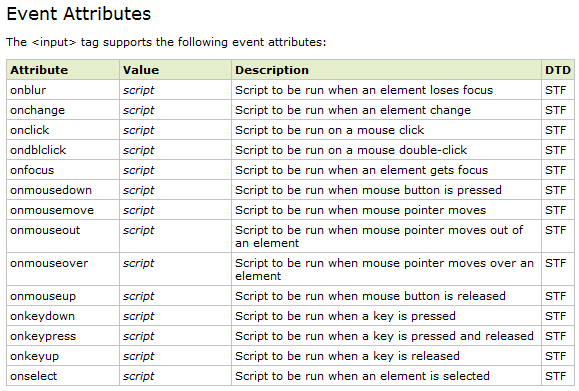
Source: w3schools
A workaround is to create an ASP.NET Button and place it inside a hidden div:
<div style="display: none;">
<asp:Button ID="btnTextBoxEventHandler" runat="server"
OnClick="btnTextBoxEventHandler_Click" />
</div>
And here's the markup for the textbox, just a regular one:
<asp:Textbox ID="txt1" runat="server" />
Now on your page onload event, add an attribute to your textbox:
protected void Page_Load(object sender, EventArgs e)
{
txt1.Attributes.Add("onblur", this.Page.ClientScript.GetPostBackEventReference(this.btnTextBoxEventHandler, ""));
}
Then of course, the event handler for the button:
protected void btnTextBoxEventHandler_Click(object sender, EventArgs e)
{
//Place code here for onblur..
}
Now place the code you want to trigger (when the textbox loses focus) inside the button event and see what happens. Try experimenting with other event attributes and ASP.NET control combinations too.
-k

When upon checking, all you see that's available is a TextChanged event. And you know that the html input tag can support other events like:

A workaround is to create an ASP.NET Button and place it inside a hidden div:
<div style="display: none;">
<asp:Button ID="btnTextBoxEventHandler" runat="server"
OnClick="btnTextBoxEventHandler_Click" />
</div>
And here's the markup for the textbox, just a regular one:
<asp:Textbox ID="txt1" runat="server" />
Now on your page onload event, add an attribute to your textbox:
protected void Page_Load(object sender, EventArgs e)
{
txt1.Attributes.Add("onblur", this.Page.ClientScript.GetPostBackEventReference(this.btnTextBoxEventHandler, ""));
}
Then of course, the event handler for the button:
protected void btnTextBoxEventHandler_Click(object sender, EventArgs e)
{
//Place code here for onblur..
}
Now place the code you want to trigger (when the textbox loses focus) inside the button event and see what happens. Try experimenting with other event attributes and ASP.NET control combinations too.
-k
Subscribe to:
Posts (Atom)


